How to apply for Instant Udyam Services in 2026
If you are planning to start a new business or are already running a small business, then getting Udyam Registration is very important. It is a government registration that gives your business the status of an MSME (Micro, Small, and Medium Enterprise). Once your business is registered, you can enjoy many benefits like easy loans, government schemes, and better business opportunities.
The good news, now you can apply for Instant Udyam Registration online in a user-friendly process, quick, and simple way.
Steps to Apply for Instant Udyam Registration
You can follow these simple steps to apply online:
First, visit the Udyam registration website where the application form is available.
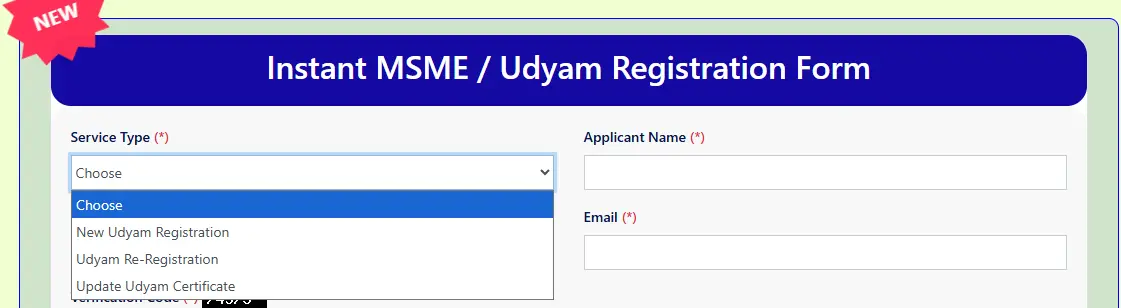
On the website, click the option for Instant Udyam Services. This section helps you apply quickly without confusion.

For example:
- If you want a new registration, choose New Udyam Registration
- If you want to update details, choose the update option.
This step helps the team understand your requirement.
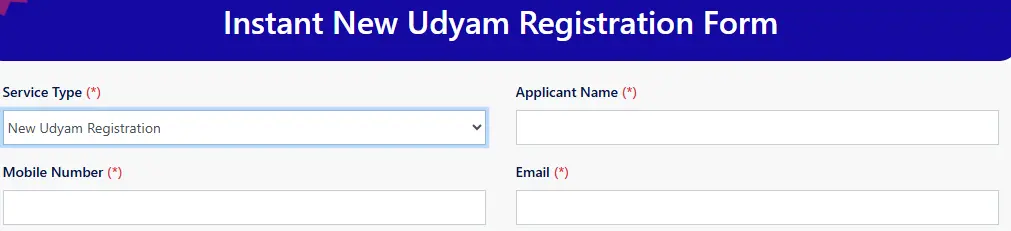
Now you need to fill out a simple form:
- Enter your name
- Provide your mobile number
- Add your email ID
Make sure all details are correct so there is no issue later.
- After filling in all the details, submit the form. Double-check your information before submitting to avoid mistakes.
- After submission, you need to pay a small fee for the service. This is a consultation or service charge for helping you complete the process smoothly.
- Once your payment is confirmed, the support team will contact you. They will guide you if any extra details or verification are needed.
After completing all steps, your Udyam Registration Certificate will be generated and sent to your registered email ID.
Note
If you already have a Udyam Registration Certificate and want to update details, you can also do that easily. Keeping your details updated is important so that you continue to receive all benefits without any problem. Visit the "Update Udyam Certificate" tab on the same portal.
Frequently Asked Questions
1. What things are needed to apply for the Udyam Registration Certificate?
To apply for a Udyam Registration Certificate, you need an Aadhaar card, PAN card, bank account details, an Aadhaar-registered mobile number, email ID, business details, and address.
2. How can I get a Udyam certificate instantly online?
Visit the Udyam Official portal, click on the Instant Udyam Service tab, then fill in the required details like Registered Mobile Number & Email ID. Click on the submit button, and you will get your Udyam Certificate in your email inbox instantly.
3. Why choose the Instant Udyam Registration Process?
If you are stuck somewhere in the Government offices or banks to get something important approval for your business, and you forgot to carry your Udyam certificate, you can immediately visit the Udyam registration portal, go to the Instant Udyam Service tab, fill in the required details like Registered Mobile Number & Email ID. Click on the submit button, and you will get your Udyam Certificate in your email inbox instantly.
4. Who can apply for Udyam Registration?
Any micro, small, or medium-sized business, like manufacturers, service providers, sole proprietors, partnerships, LLPs, private limited companies, Hindu Undivided Families, and trusts can apply for the Udyam Registration Certificate.
Client Testimonials
I need the Udyam registration certificate urgently. I applied for a Udyam certificate on the Udyam India website, and I got my Udyam Certificate instantly in just 10 to 15 minutes.
— Priya Saha, Gujarat
I was confused about the government Udyam Registration Process, but Executive Puja guided me properly. Thanks to their support, I got my Udyam Certificate instantly without any hassle.
— Sanjay Kumer, Ranchi
I am a business owner, and I want bank loans, so I need Udyam registration instantly. I applied to the Udyam India website, and I got my Udyam Certificate instantly without any problem. Customer support is very helpful. Highly recommended!
— Amit Rana, Jamshedpur
Author Bio
Sapna
I am Sapna, helping business owners since 2018 from Jharkhand, India, with their Udyam Registration Certificate consultation services. Apply & download, re-registration, and updating Udyam also helps them to download their Udyam certificate instantly.