Mistakes in Udyam Registration? Here's How to Edit & Correct Your Certificate
The Udyam Registration Certificate is the certificate provided by the Government of India to MSMEs. Are you a business owner in India and have already registered your business under the MSME /Udyam Registration Portal. You find that your Udyam details are wrong or incorrect, such as an incorrect business name, wrong mobile number or Email ID, a different address, or errors in bank details and more details. To avoid any of these problems, Edit Udyam Registration Certificate to continue getting government benefits, schemes, and bank loans.
Common Mistakes Found in Udyam Certificate
Business owners commonly encounter these errors on their certificate:
- Incorrect business address
- Wrong mobile number or Email ID
- Spelling mistakes in business name
- Bank account details wrong
- Wrong NIC codes
- Business name or enterprise name wrong
- Wrong classification year
Keep your Udyam details accurate as soon as possible to avoid disruptions to your MSME benefits.
What is Udyam Certificate Update and Why Does It Matter?
Udyam Certificate update means changing or editing business information in the Udyam Registration Portal. Keeping your details updated helps avoid problems while applying for government schemes, loans, subsidies, and other MSME benefits.
Also, an updated certificate helps build trust with banks, the financial department, and other business partners. If the details are outdated or incorrect, you can face delays in approvals, loans, or miss opportunities available to MSMEs.
What Details Can Change in a Udyam Certificate?
The Udyam Registration portal allows business owners to update their business details as required.
Details You Can Update
- Address updates
- Business activity change
- Bank details change
- Change in number of employees
- Email and mobile number changes
- Classification year
- Change your business name or enterprise name
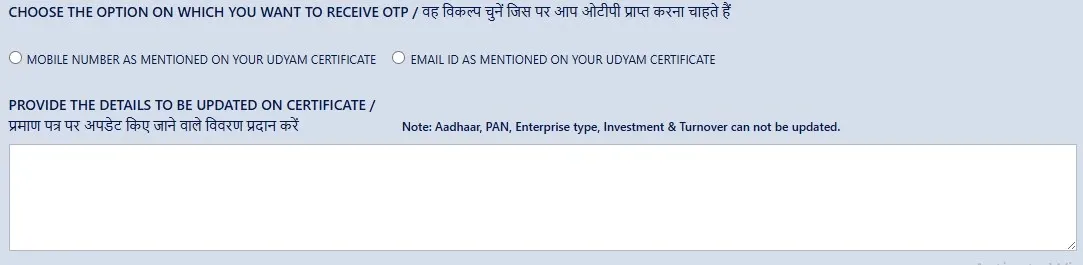
Details You Cannot Update
Some details cannot be changed after registration, including:
- PAN details
- Aadhaar details
- Proprietor / Owner Name
- State and district in business address
These details cannot be updated, or any changes in the Udyam Certificate. If you find these details are wrong or incorrect, you can Cancel Udyam Certificate.
Documents Required for Updating Udyam Certificate
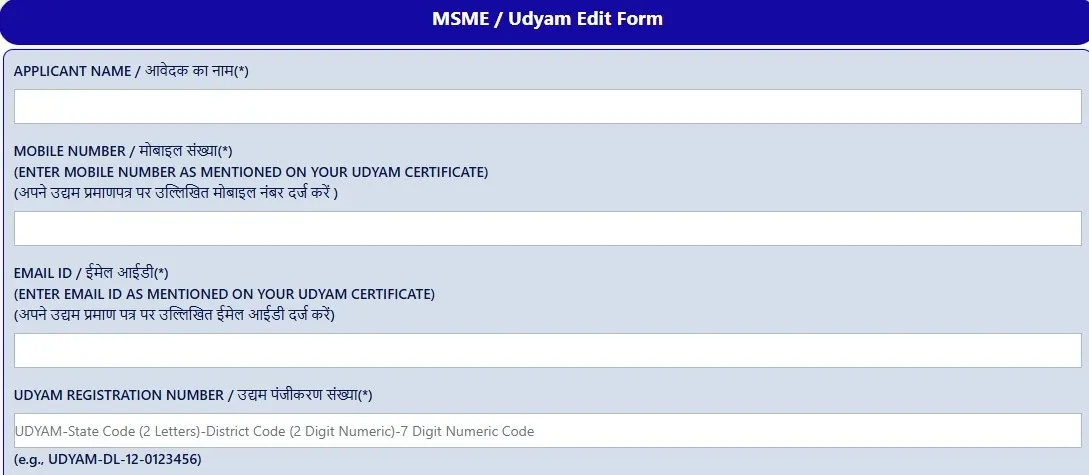
The update process is simple and does not require many documents. Keep these details ready:
- Udyam Registration Number (URN)
- Registered mobile number
- Registered email ID
OTP verification will be done via your Udyam-registered mobile number or email ID.
How to Edit or Correct Udyam Certificate — Step by Step
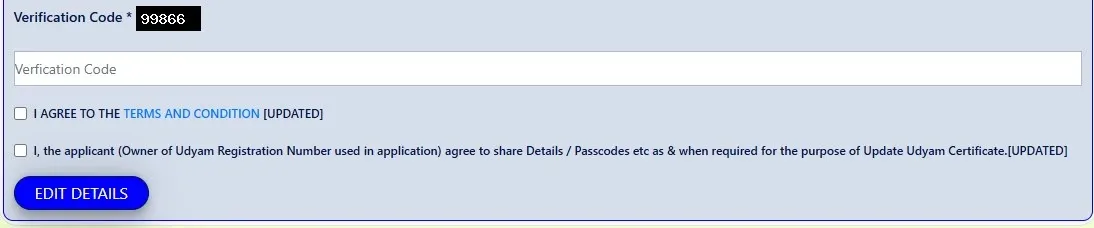
When You Need to Update Udyam
Update is required when you already have a registration on the Udyam Registration Portal and have a valid Udyam Registration Number (URN) or certificate, and only want to change existing information.
Examples include:
- Business address incorrect
- Wrong email ID or mobile number
- Bank account details wrong
- Add business activities
- Spelling mistake in business name
- Change classification year
- Wrong NIC codes
- Business name wrong
In such cases, you need to update the Udyam Certificate.
When You Need to Re-Register on the Udyam Portal
Re-Registration Need Only, If your Business register earlier MSME registration Process Old Udyog Aadhaar System.
Earlier, businesses registered under:
- Udyog Aadhaar Memorandum (UAM)
Now , this has changed:
- Udyam Registration
If you are still registered under the previous Udyog Aadhaar process, you are required to re-register on the Udyam Re-Registration Portal online to continue receiving MSME government benefits and schemes.
Troubleshooting Common Udyam Update Problems
1. OTP Not Received
If you are not receiving the OTP:
- Check your mobile network connection
- Verify the registered mobile number is active
- Wait a few minutes and request a new OTP
- Check the spam/junk folder of your email
- Check your registered mobile SMS section
2. Portal Error 500 While Updating
An Error 500 generally indicates a server-side issue. Refresh the page and try again. If the error continues, wait for server maintenance to complete or contact support.
3. Updated Certificate Not Downloading
- Confirm the update request was successfully submitted
- Wait a few minutes, then log out and log back into the Udyam Portal
- Try downloading again and check your network connection
4. Mobile Number Has Changed
If you no longer have access to your registered mobile number, you can still receive an OTP on your registered email ID during the update process. First update your contact details through the portal.
Benefits of Updating Your Udyam Certificate
- Smooth loan approval processing
- Easily access government schemes
- Apply for multiple schemes and tenders without issues
- Business information stays accurate
- Avoid delays or rejection problems
- Improves business credibility with banks and partners
What Happens If You Do Not Update Your Udyam Certificate?
- Your certificate will have old business details, causing issues during verification.
- You may face delays or rejection when applying for MSME benefits, bank loans, or tenders.
- Banks and financial offices verify Udyam details before processing applications.
- Incorrect information can create issues while availing MSME-related services.
Conclusion
Editing and correcting the Udyam Registration Certificate details is a simple, easy, and fully online process. Knowing the difference between updating and Udyam re-registration can save you time and help avoid unnecessary problems.
Whether you are correcting contact details, updating business information, resolving OTP issues, or fixing a certificate download problem — don't wait. Update your Udyam Registration now and ensure you continue to receive all government benefits and schemes without any disruption.
Frequently Asked Questions
There is no limit on how many times you can update your Udyam Certificate. It can be
updated whenever your business details change.
If you change your business information and do not update your Udyam Certificate, it
can create problems when applying for government schemes, MSME benefits, bank loans,
or tenders that require updated business information.
PAN and Aadhaar details cannot be edited or updated through the Update Udyam process,
as these details are linked to your registration. If these details are incorrect, you
will need to cancel your Udyam Registration and re-register.
Yes, you can add a new business activity to your existing Udyam Certificate. If your
business has expanded or added new services or a new business address, update your
Udyam Registration Certificate accordingly.
For updating Udyam, you need your Udyam Registration Number (URN), your registered
mobile number, and your registered email ID.
There is no limit on how many times you can update your Udyam Certificate. It can be updated whenever your business details change.